Horizon Mobile Wallet for Counterparty, Ordinals and ZELD
TL;DR
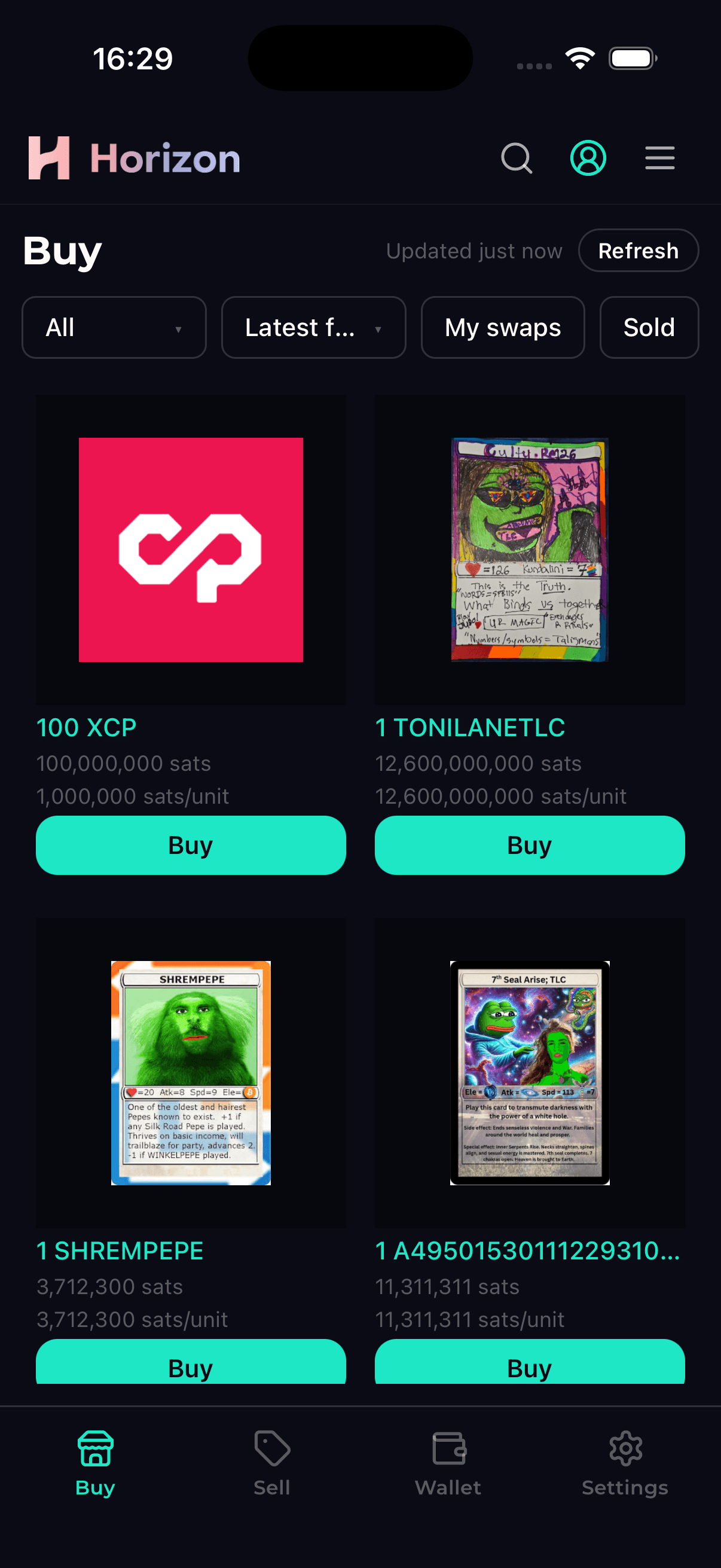
- Horizon Market is now a mobile app—native on iOS and Android, free, and currently awaiting approval on the App Store and Google Play.
- It’s also a wallet. Import your 12-word recovery phrase from Horizon Wallet or another compatible wallet, or create a new one in the app.
- Protected by your phone’s security. Face ID, Touch ID or fingerprint authentication, with your device passcode as a fallback. Your private key stays in your device’s secure storage, never on our servers.
- Open source, on a public API. The app and client library are MIT-licensed on GitHub, and every endpoint they call is documented and public.
- One flow for every asset. Buy and sell Counterparty tokens, Ordinals inscriptions, Kontor assets and ZELD through the same interface.
- Create and sell from your phone. Issue a Counterparty token or an Ordinals inscription, then open its listing form with one tap.
- The website has been redesigned to match, so you’ll feel at home on both mobile and desktop.
Horizon Market is coming to iOS and Android! The app has been submitted to the App Store and Google Play and is now awaiting approval. Soon, everything you need to buy, sell and manage Bitcoin-native assets will be on your phone.
The app is a native application built on the same public API as the website, with a full Bitcoin wallet built in. It brings Horizon Market and Horizon Wallet together in a single app.
It’s a Full Bitcoin Wallet
Sign in with your email and a wallet is created for you, just as on the web. You can also restore an existing 12-word recovery phrase or generate a new one in the app.
Recovery-phrase wallets use standard derivation: BIP84 for native SegWit and BIP86 for Taproot, supported by Horizon Wallet, XVerse and other compatible Bitcoin wallets. That means:
- Import your Horizon Wallet phrase into the app to access your addresses, balances and history.
- Create a wallet in the app, save the 12 words, and import them into XVerse or the Horizon Wallet extension later to access the same addresses and funds.
- Export your recovery phrase whenever you need it, so you can keep using your wallet outside Horizon.
From the Wallet tab, you can check your BTC and token balances, deposit, withdraw and sell your holdings. Tap Sell beside an asset to open the listing form with that asset already selected.
Built-in Wallet Security
The app uses your phone’s built-in security features to protect your wallet:
- Biometric lock. Once a wallet is connected, the app requires Face ID, Touch ID or fingerprint authentication, with your device passcode as a fallback. It locks again after a short time in the background, so a quick app switch doesn’t require another scan. You can browse the market without authentication when no wallet is connected.
- Keys in secure storage. Your private key is stored in your device’s Keychain or Keystore, protected by the same authentication requirement. Transactions are signed locally on your phone, and the API receives only the signed transaction.
- Hidden app previews. When the app leaves the foreground, it covers the screen so your balances and addresses don’t appear in the app switcher.
- Protected recovery phrase screens. Each of your 12 words stays masked until you tap it. On Android, these screens also block screenshots and screen recording.
- Excluded from device backups. The app’s data is kept out of device backups, including cloud backups.
Open Source, on a Public API
The app, the TypeScript client library behind it, and the desktop and CLI clients are all available in one MIT-licensed repository: github.com/UnspendableLabs/Horizon-Market-Client.
You can review how keys are derived, stored and used, or build your own client with the same library. It’s available on npm as @unspendablelabs/horizon-market-client.
The app runs on the public Horizon Market Atomic Swap API, with full documentation for every endpoint it uses. There’s no separate private API for mobile, and the API never receives your private key.
The Same Flow for Every Asset
Trading across Bitcoin protocols often means switching tools and learning different interfaces. Horizon brings those trades into the same Buy and Sell tabs.
Whether you’re trading:
- a Counterparty token,
- an Ordinals inscription,
- a Kontor asset or NFT,
- or ZELD,
you’ll use the same screens to select an asset, review the trade and confirm. The app handles the protocol-specific transaction details.
Search, token pages, price charts, your profile, points and credits are all there too.
Create Something, Then Sell It
You can create assets straight from your phone. Open the Create screen to get started:
- Counterparty tokens—set the name, supply, divisibility and lock options, and choose artwork from your camera roll.
- Ordinals inscriptions—inscribe an image and choose your fee rate before submitting.
Once the asset is created, it appears in your Wallet tab. Tap Sell beside it to open the listing form with the asset already selected. You can go from creating an asset to listing it without leaving the app.
The Website Now Looks Like the App
We’ve also redesigned horizon.market!
The website now shares the mobile app’s layout, flows and terminology. If you’ve been using Horizon on desktop, the app will feel familiar—and anything you learn on mobile will carry over to the website.
What’s Next
The app launches with buying, selling, wallet management and asset creation. There’s more to bring over from the website, and we’ll keep adding those features in future releases.
Our goal is to let you do everything from your phone that you can do on Horizon Market’s website. We’re excited to get this first release into your hands and hear what you want next.
Coming Soon
The app is currently in review with Apple and Google. We’ll announce it as soon as it’s live on the App Store and Google Play.
Follow us on X @hznmarket so you know when it’s available. Questions or feedback? Join our Telegram group and tell us what you’d like to see in the app next.