Introducing Horizon Market's Embedded Wallet
Introducing Horizon Market's Embedded Wallet
TL;DR
- New embedded wallet option – Horizon Market now includes Web3Auth, an email-based Bitcoin wallet built directly into the platform
- Zero installation required – no browser extensions or mobile apps needed, works on any device with a web browser
- Email-only onboarding – verify your email and start trading Counterparty assets immediately
- Full wallet functionality – buy, sell, sign transactions, and manage your Bitcoin address
We've been making trading on Horizon Market progressively easier since launching 2.0. This update takes the next step: you no longer need a browser extension or mobile wallet to get started—just an email address.
What It Is
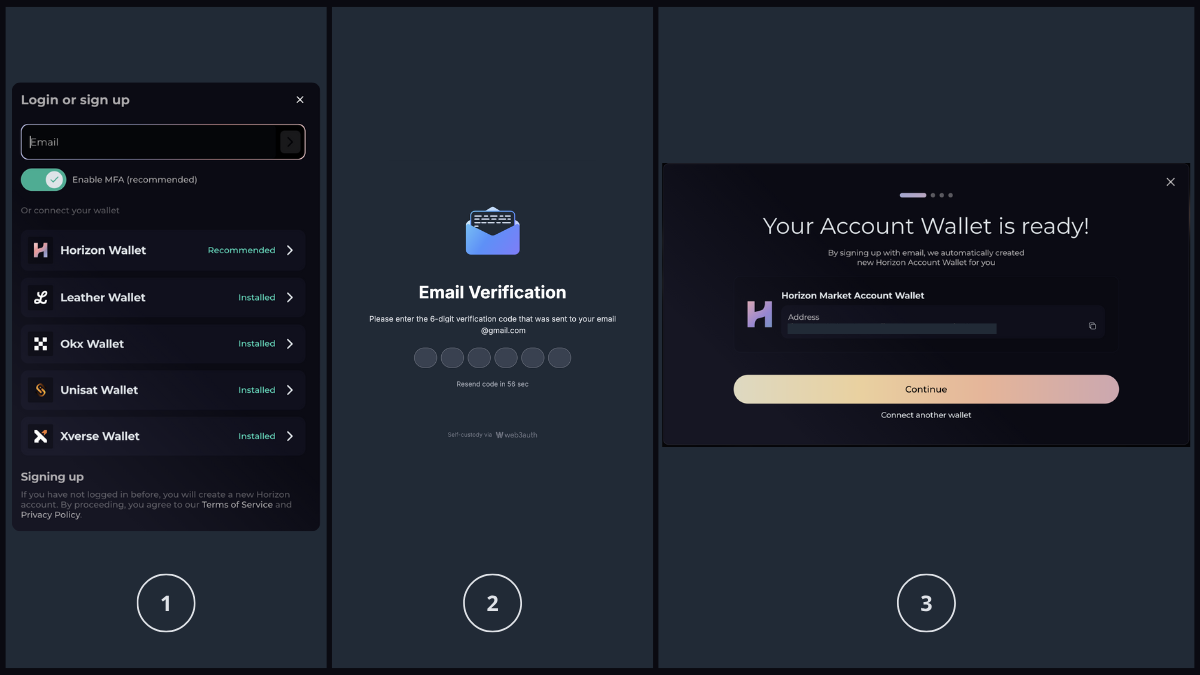
Horizon Market now supports Web3Auth, an email-based Bitcoin wallet that works directly in your browser. Getting started takes three steps:
- Sign in with your email address
- Verify with a one-time code sent to your inbox
- Your Bitcoin wallet is created instantly
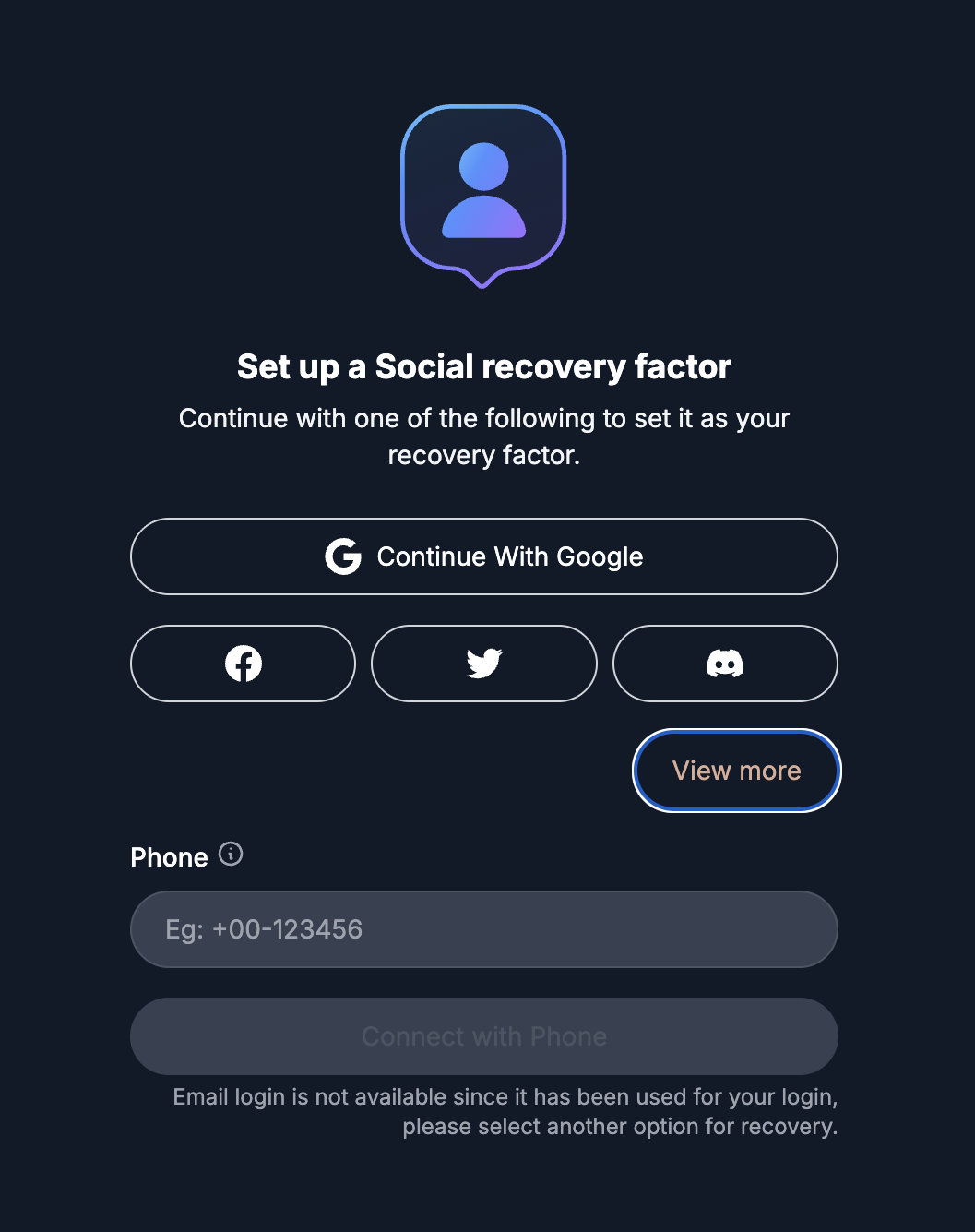
During sign-up, you can optionally enable multi-factor authentication (MFA) and set up backup factors like social recovery for enhanced security. You can also adjust these settings anytime you log in to your account.
How Your Key is Protected
Web3Auth uses advanced cryptography to secure your private key by splitting it into multiple shares. These shares must be combined to reconstruct your key and sign transactions.
Without MFA: Your key is split into 2 shares:
- One stored in your browser
- One stored on Web3Auth servers
Both shares are combined during login to reconstruct your key.
With MFA enabled (enhanced security): Your key is split into 3 shares:
- One stored in your browser
- One stored on Web3Auth servers
- One linked to your chosen backup factor (Google, Facebook, Twitter, Discord, SMS or other recovery method)
Only 2 of these 3 shares are needed to reconstruct your key, meaning you can recover your wallet even if you lose access to one factor.
Your complete private key is shown immediately after wallet creation and remains exportable at any time. We strongly recommend backing it up securely.
Why This Matters
For newcomers: Getting started with Bitcoin assets has always meant installing browser extensions, choosing between wallet providers, understanding seed phrases, and navigating unfamiliar authentication flows. Email + verification code is how users already log into everything. This familiar pattern removes the learning curve entirely.
For everyone: Your wallet works on any device with a browser. No need to remember which computer has your extension installed or where you left your phone with the mobile wallet. Access your assets from anywhere.
What You Can Do
With your Web3Auth, you can:
- Buy and sell Counterparty assets on Horizon Market
- Sign PSBT transactions for atomic swaps
- Sign messages for authentication
- View your Bitcoin address and balance
- Export your private key for backup or migration
Choosing Your Wallet
The Web3Auth embedded wallet prioritizes accessibility and ease of use. Here's how it compares to browser extension wallets:
Why choose the embedded wallet:
- Works immediately without installation on any device
- Familiar email authentication, no need to learn about seed phrases or wallet extensions upfront
- Consistent experience across all browsers with no compatibility issues
- Lower technical barrier for newcomers to Bitcoin and Counterparty
Why choose a browser wallet:
- Complete self-custody with locally-stored private keys
- Advanced features like custom fee rates, UTXO selection, and address type management
- Pseudonymous access without providing an email address
- Native wallet confirmation UI
Important considerations for Web3Auth:
- Recovery: Account recovery depends on email access and Web3Auth's service availability. Browser wallets rely on your locally-stored seed phrase.
- Functionality: The embedded wallet provides essential signing and transaction features. Browser wallets often include more advanced controls.
- Confirmation flow: Transaction confirmations appear in custom in-app dialogs rather than through native wallet UI.
Both options provide full trading functionality on Horizon Market. You can export your private key anytime if you want to migrate to a browser wallet.
Available Now
The email-based wallet is live on Horizon Market. Existing users can continue using their browser wallets, while new users can choose the authentication method that works best for them. Questions about wallet options or want to share feedback? Join our Telegram group and connect with the community.